Structured LLM Outputs Made Easy: Building a Slack Digest Agent with Pydantic AI
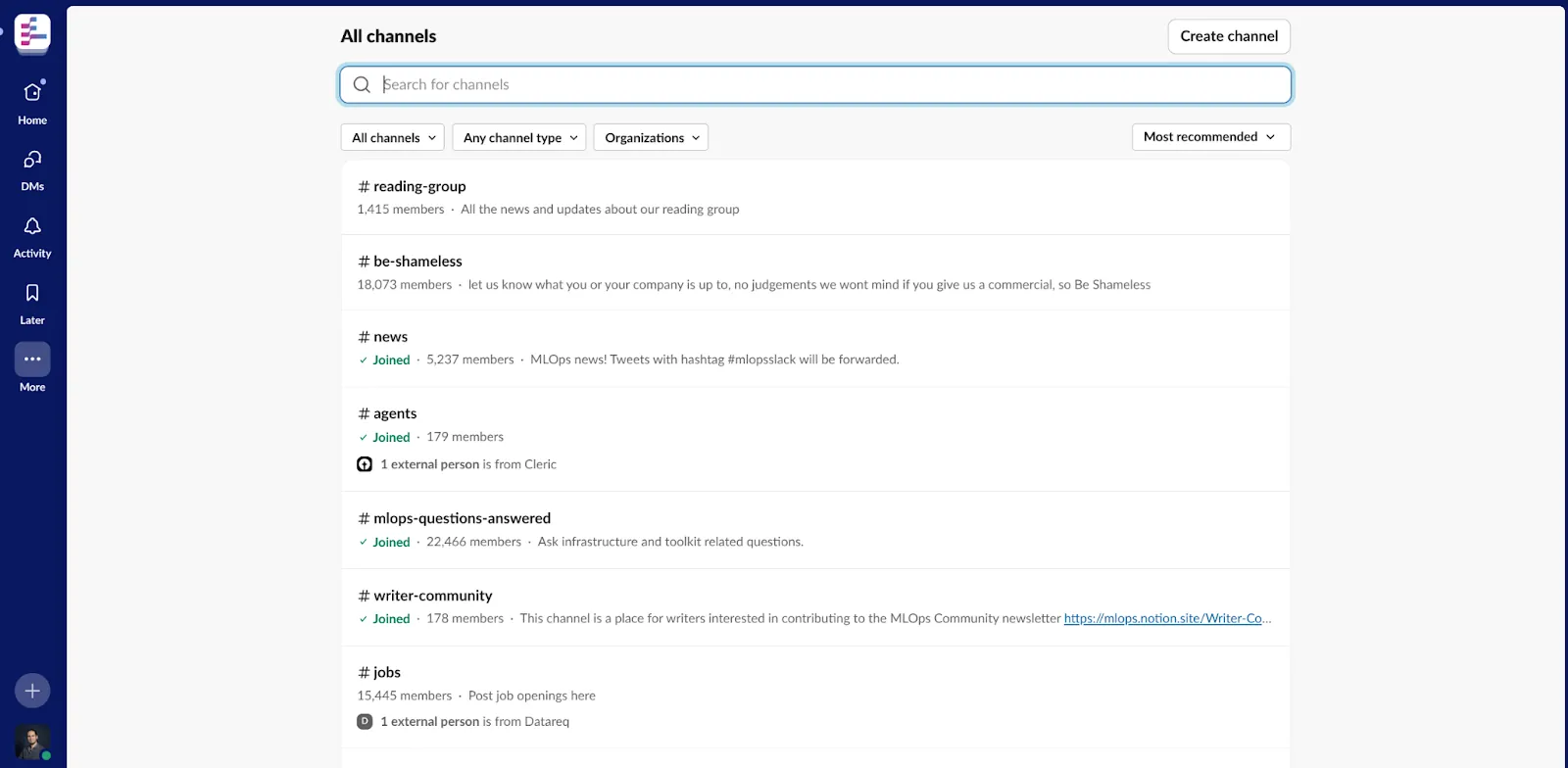
As developers and AI practitioners, many of us belong to vibrant online communities, like the MLOps Community on Slack. These platforms are…
As developers and AI practitioners, many of us belong to vibrant online communities, like the MLOps Community on Slack. These platforms are fantastic hubs for knowledge sharing, discussion, and collaboration. However, they can also become overwhelming sources of information. Keeping up with dozens of channels and hundreds of messages daily is a real challenge!

Wouldn’t it be great to have a personal assistant that could sift through the noise, identify the most relevant conversations, and summarize them neatly for you?
That’s exactly what I set out to build with the MLOps Digester project — a simple agent designed to fetch interesting Slack threads and generate concise summaries. And the secret sauce making this manageable and reliable? Pydantic AI.

In this post, we’ll dive into how Pydantic AI helps bridge the gap between the often unstructured, free-form text generated by Large Language Models (LLMs) and the structured data formats we need for robust applications. We’ll use the MLOps Digester as a practical example.
The Challenge: Getting Structured Data from LLMs
LLMs like OpenAI’s GPT models or Google’s Gemini are incredibly powerful at understanding and generating human-like text. You can ask them to summarize conversations, extract key points, or classify information. However, getting the output exactly in the format you need (like specific JSON fields) often requires complex prompt engineering and can still be brittle. The LLM might hallucinate fields, miss required ones, or return data in an inconsistent structure.
Enter Pydantic AI: Validation Meets Language Models
If you’re a Python developer, you’ve likely encountered Pydantic. It’s a fantastic library for data validation and settings management using Python type annotations. You define how your data should look using standard Python classes, and Pydantic handles the parsing, validation, and error handling.
Pydantic AI cleverly extends this concept to LLM interactions. It allows you to:
- Define your desired output structure using a standard Pydantic model.
- Provide this model alongside your prompt to an LLM (via Pydantic AI’s interface).
- Pydantic AI guides the LLM to generate output that conforms to your defined model.
- It automatically parses and validates the LLM’s response against your Pydantic model.
Essentially, Pydantic AI acts as a mediator, ensuring the LLM’s creativity adheres to the structural requirements you define.
Use Case: The MLOps Digester Agent
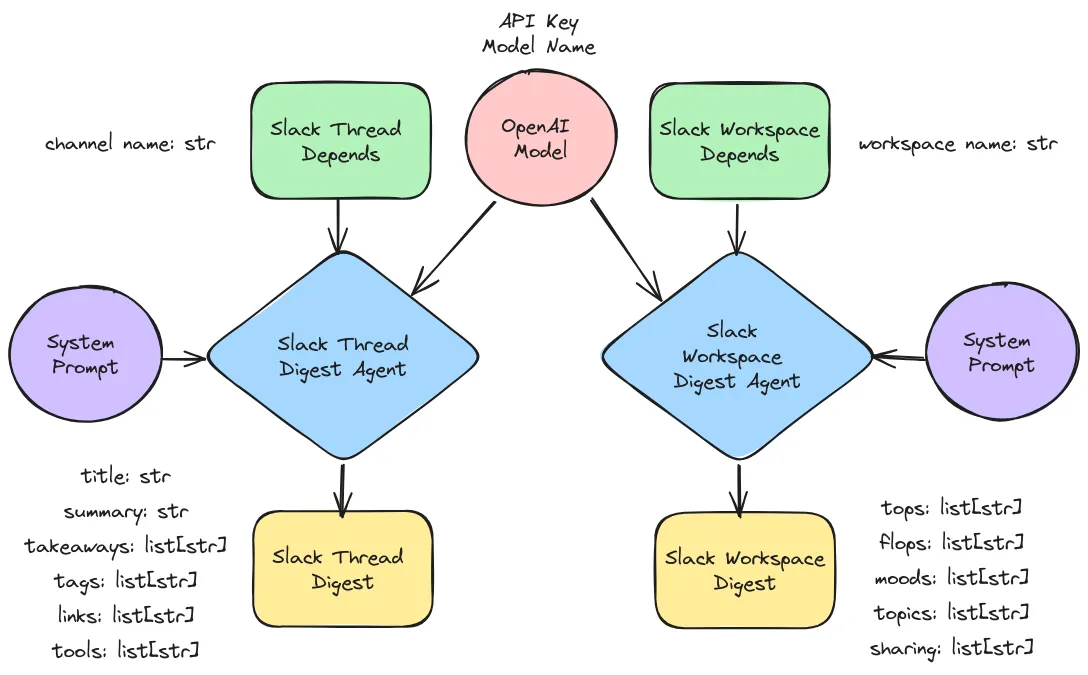
In the mlops-digester project, the goal is to process transcripts of Slack threads and generate a structured Digest containing summaries of the most relevant ones. We need a consistent output format to reliably display or further process these digests.
1. Defining the Structure:
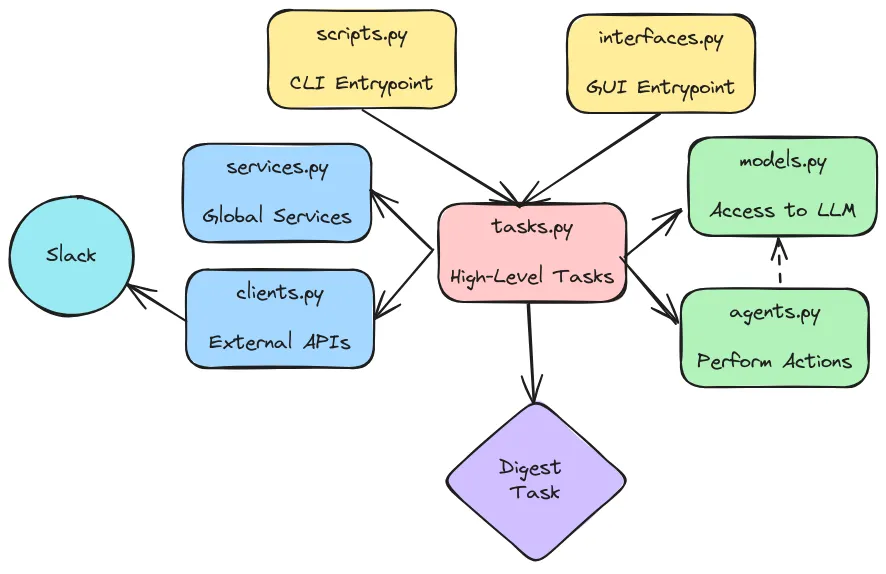
First, we define our desired output structure using Pydantic models. In src/mlops_digester/results.py, we have something like this:
import pydantic as pdt

class SlackThreadDigest(pdt.BaseModel):
    """Digest of a Slack thread."""

    title: str
    summary: str
    takeaways: list[str]
    tags: list[str]
    links: list[str]
    tools: list[str]


class SlackWorkspaceDigest(pdt.BaseModel):
    """Digest of a Slack workspace."""

    tops: list[str]
    flops: list[str]
    moods: list[str]
    topics: list[str]
    sharing: list[str]
Here, the SlackThreadDigest defines the fields we want for each summarized thread. On the other hand, the SlackWorkspaceDigest summarizes the key points of a whole Slack Workspace.
2. Creating the Agent:
Next, in src/mlops_digester/agents.py, we create an agent that uses Pydantic AI. This involves initializing PydanticAI with an LLM client (like OpenAI’s or Gemini’s) and then using it to process the input text based on our desired Pydantic model.
def to_slack_thread_digest_agent(
    slack_thread_digest_agent_settings: settings.SlackThreadDigesterAgentSettings,
) -> SlackThreadDigestAgent:
    """Create an agent for digesting Slack threads from settings."""
    agent = pdtai.Agent(
        name=slack_thread_digest_agent_settings.name,
        model_settings=slack_thread_digest_agent_settings.model_settings,
        deps_type=depends.SlackThreadDepends,
        result_type=results.SlackThreadDigest,
    )

    @agent.system_prompt
    def agent_system_prompt(ctx: pdtai.RunContext[depends.SlackThreadDepends]) -> str:
        """Define the system prompt for the agent."""
        slack_channel_name = ctx.deps.channel_name
        system_prompt = f"""{slack_thread_digest_agent_settings.system_prompt}

        The Slack Channel Name is: {slack_channel_name}
        """
        return system_prompt

    return agent
3. Running the Main Tasks
The magic happens in src/mlops_digester/tasks.py. We provide the raw Slack transcript within a prompt and tell Pydantic AI we expect an output conforming to the Digests model. Pydantic AI handles the interaction with the LLM, the parsing, the validation, and potentially the retries, finally returning a validated Digest object (or raising an error if it fails).
def fetch_slack_content(
    fetch_slack_content_step_settings: settings.FetchSlackContentStepSettings,
    slack_client: slack.WebClient,
) -> SlackContent:
    """Fetch MLOps content from Slack channels, messages, and replies."""
    # dates
    end_date = datetime.datetime.now()
    start_date = end_date - datetime.timedelta(
        days=fetch_slack_content_step_settings.since_last_days
    )
    # channels
    slack_channels = {}
    if fetch_slack_content_step_settings.channels:
        for slack_channel_id in fetch_slack_content_step_settings.channels:
            slack_channel_result = slack_client.conversations_info(channel=slack_channel_id)
            slack_channel = slack_channel_result["channel"]  # extract channel data
            slack_channels[slack_channel["id"]] = slack_channel
    else:
        slack_conversations = slack_client.conversations_list(
            limit=fetch_slack_content_step_settings.max_channels_per_workspace,
            exclude_archived=fetch_slack_content_step_settings.exclude_archived_channels,
        )
        for slack_channel in slack_conversations["channels"]:
            slack_channels[slack_channel["id"]] = slack_channel
    # messages
    for slack_channel_id, slack_channel in slack_channels.items():
        slack_channel_messages = slack_channel.setdefault("messages", {})
        try:
            slack_conversation_history = slack_client.conversations_history(
                channel=slack_channel_id,
                oldest=str(start_date.timestamp()),
                limit=fetch_slack_content_step_settings.max_messages_per_channel,
            )
            for slack_channel_message in slack_conversation_history["messages"]:
                slack_channel_messages[slack_channel_message["ts"]] = slack_channel_message
        except slack_errors.SlackApiError as slack_api_error:
            logger.warning(f"Error while Fetching Slack Channel Messages: {slack_api_error}")
    # replies
    for slack_channel_id, slack_channel in slack_channels.items():
        for slack_message_ts, slack_message in slack_channel["messages"].items():
            slack_message_replies = slack_message.setdefault("replies", {})
            slack_message_thread = slack_client.conversations_replies(
                ts=slack_message_ts,
                channel=slack_channel_id,
                limit=fetch_slack_content_step_settings.max_replies_per_message,
            )
            for slack_message_reply in slack_message_thread["messages"]:
                slack_message_replies[slack_message_reply["ts"]] = slack_message_reply
    return slack_channels
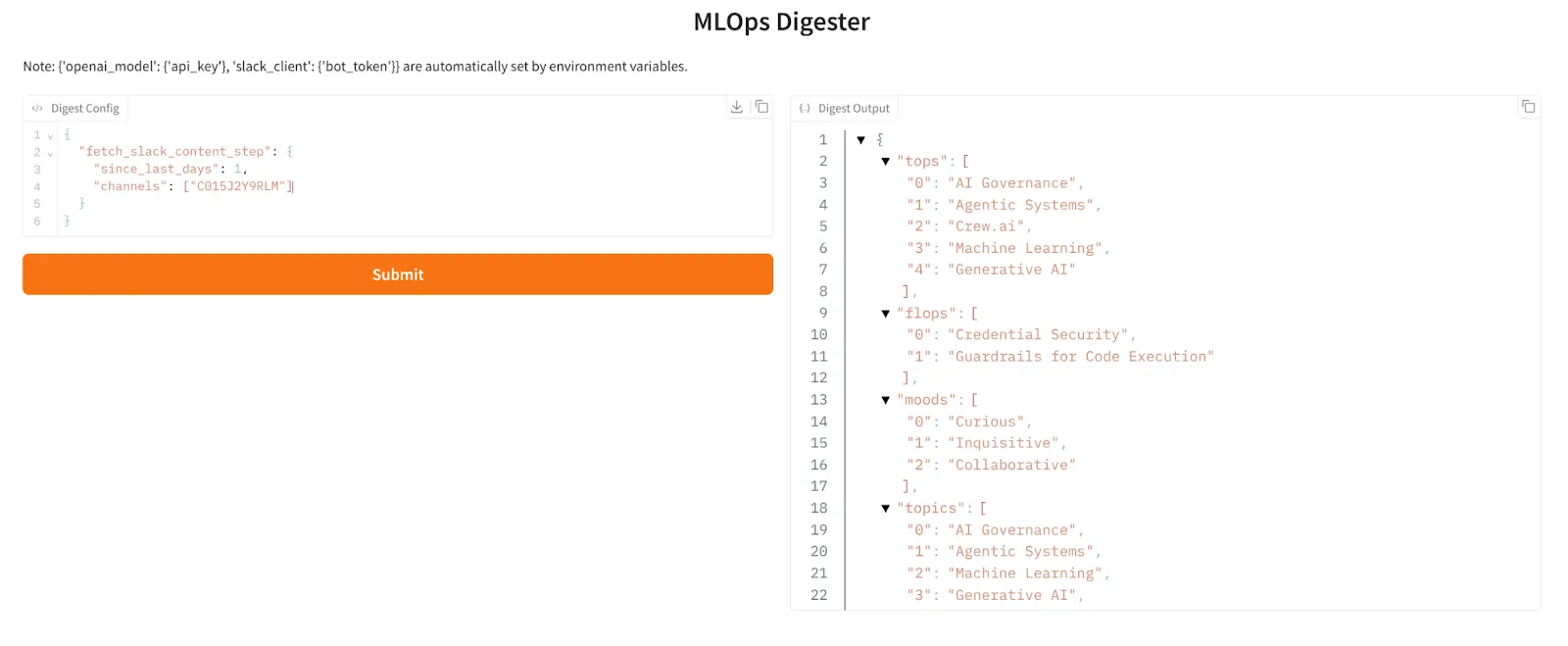
This gives us confidence that digest_output will have all the required fields (title, summary, takeaways) and nested structures (SlackThreadDigest and SlackWorkspaceDigest) we defined, ready for use in our application.
Pydantic AI: A Quick Review
Based on my experience using it in this project and exploring its capabilities:
Strengths:
- Reliable Structured Output: This is its killer feature. Significantly increases the reliability of getting JSON or other structured data from LLMs compared to prompt engineering alone.
- Leverages Pydantic’s Power: Uses the familiar and powerful validation features of Pydantic. If you already use Pydantic, the learning curve is gentle.
- Improved Developer Experience: Reduces the need for complex output parsing and validation logic in your application code. Type hints provide great editor support.
- LLM Agnostic: Designed to work with various LLM providers (OpenAI, Gemini, Bedrock, etc.), giving you flexibility.
Weaknesses:
- Abstraction Leak: Pydantic AI relies on the underlying LLM’s ability to understand the request and the structure. If the LLM fundamentally struggles with the task complexity or the data, Pydantic AI can only enforce the format, not guarantee the semantic correctness beyond what the LLM provides.
- Overhead: Adds another dependency to your project. For extremely simple, single-field extractions, it might feel like overkill (though still often worth it for the validation).
- Prompting Still Matters: While it handles structure, you still need to write clear prompts to guide the LLM on what content to generate for the fields. The descriptions in your Pydantic models become part of this implicit prompt.
Conclusion
Pydantic AI is a powerful tool for any developer working with LLMs who needs reliable, structured output. By combining the robust data validation of Pydantic with intelligent LLM interaction, it significantly simplifies the process of integrating generative AI into applications that require predictable data formats.
The MLOps Digester project demonstrates how Pydantic AI can turn a potentially messy task — summarizing noisy Slack conversations — into a structured, manageable output. It streamlines development, improves reliability, and lets you focus more on the application logic rather than fighting with inconsistent LLM responses.
If you’re building applications that consume LLM output, especially for data extraction, classification, or structured content generation, I highly recommend giving Pydantic AI a try.
Link to the GitHub Repository: https://github.com/fmind/mlops-digester/tree/main
Build a Slack Agent with Pydantic AI [Step-by-Step Tutorial]