Scaling the Summit: Challenges for Serving LLMs at Scale on GCP
Navigate the challenges of scaling LLMs on GCP and get benchmark insights for cost-effective, reliable, and quick LLM serving.
Deploying a Large Language Model (LLM) into a production environment can feel like transitioning from a peaceful hike to a treacherous mountain expedition. Serving LLM models at scale presents its own formidable set of challenges. It’s not just about getting a model to respond; it’s about doing so reliably, quickly, and cost-effectively under heavy user load.

On Google Cloud Platform (GCP), you have a spectrum of solutions at your disposal, each with its own trade-offs between simplicity and control. This article dives into the practical realities of serving LLMs on GCP, reviewing the out-of-the-box options and sharing insights from a hands-on benchmark. We’ll explore why deploying even a seemingly straightforward model like Gemma 3 12B can get tricky and help you choose the right path for your specific needs, before you even start thinking about complex optimizations.
🧗 The Tricky Terrain: Model and Hardware
Before we dive into the platforms, let’s talk about a foundational challenge: matching your model to your hardware. For our benchmarks, I chose to serve Gemma 3 12B, a powerful open model from Google. I aimed to use the Nvidia L4 GPU, a cost-effective and widely available accelerator on GCP.
Here’s the catch: a 12-billion parameter model in its standard bfloat16 precision requires more than 24GB of GPU memory. The L4 GPU has exactly 24GB. This creates a tight squeeze, often leading to out-of-memory errors. To make it work, we have two primary options:
- Use Multiple GPUs: Distribute the model across two or more L4 GPUs. This works but doubles your baseline hardware cost and adds configuration complexity.
- Use Quantization: Employ techniques like 4-bit quantization to shrink the model’s memory footprint. This allows it to fit on a single L4 but can introduce a slight degradation in accuracy.
An alternative path is to simplify the pipeline by using a smaller model, like Gemma 3 4B. It fits comfortably on a single L4 GPU, reducing complexity and cost, but at the expense of some of the model’s reasoning capability. This trade-off between model power, hardware cost, and operational complexity is a central theme in serving LLMs.

⚙️ The Benchmark Setup
To test these solutions under pressure, I used Locust, a powerful open-source load testing tool. The goal was to simulate a real-world scenario where the number of concurrent users ramps up over time, allowing us to observe how each setup behaves under increasing strain.
The benchmark was configured to run for 5 minutes for each solution, ramping up from 0 to 250 concurrent users at a rate of 1 new user per second. Each virtual user continuously sends prompts from the databricks-dolly-15k dataset. The prompts are sent with a temperature of 0.0 for deterministic outputs and a max_output_tokens limit of 1000. This setup allows us to measure key performance indicators like failure rate, response time, and throughput as the load intensifies.
# Example of benchmark in locustfile.py
class VertexAIMaaS(Benchmark, lc.HttpUser):
    """Locust user for benchmarking Vertex AI Model as a Service."""

    host: str = (
        f"https://{LOCATION}-aiplatform.googleapis.com"
        if LOCATION != "global"
        else "https://aiplatform.googleapis.com"
    )

    @lc.task
    def predict(self):
        """Send a prediction request to the Vertex AI Model as a Service."""
        config = {
            "temperature": self.options.temperature,
            "thinkingConfig": {"thinkingBudget": 0},
            "maxOutputTokens": self.options.max_output_tokens,
        }
        headers = {
            "Content-Type": "application/json",
            "Authorization": f"Bearer {self.bearer}",
        }
        url = f"/v1/projects/{self.options.project_id}/locations/{self.options.location}/publishers/google/models/{self.options.model}:generateContent"
        for text in self.iter_data():
            contents = [{"role": "user", "parts": [{"text": text}]}]
            body = {"contents": contents, "generationConfig": config}
            self.client.post(url=url, json=body, headers=headers)
🗺️ GCP’s LLM Serving Options: A Review
We evaluated four distinct approaches for serving LLMs on GCP, intentionally excluding the highly manual process of setting up from scratch on a Compute Engine instance.
1. Vertex AI MaaS (Model-as-a-Service) 🏞️
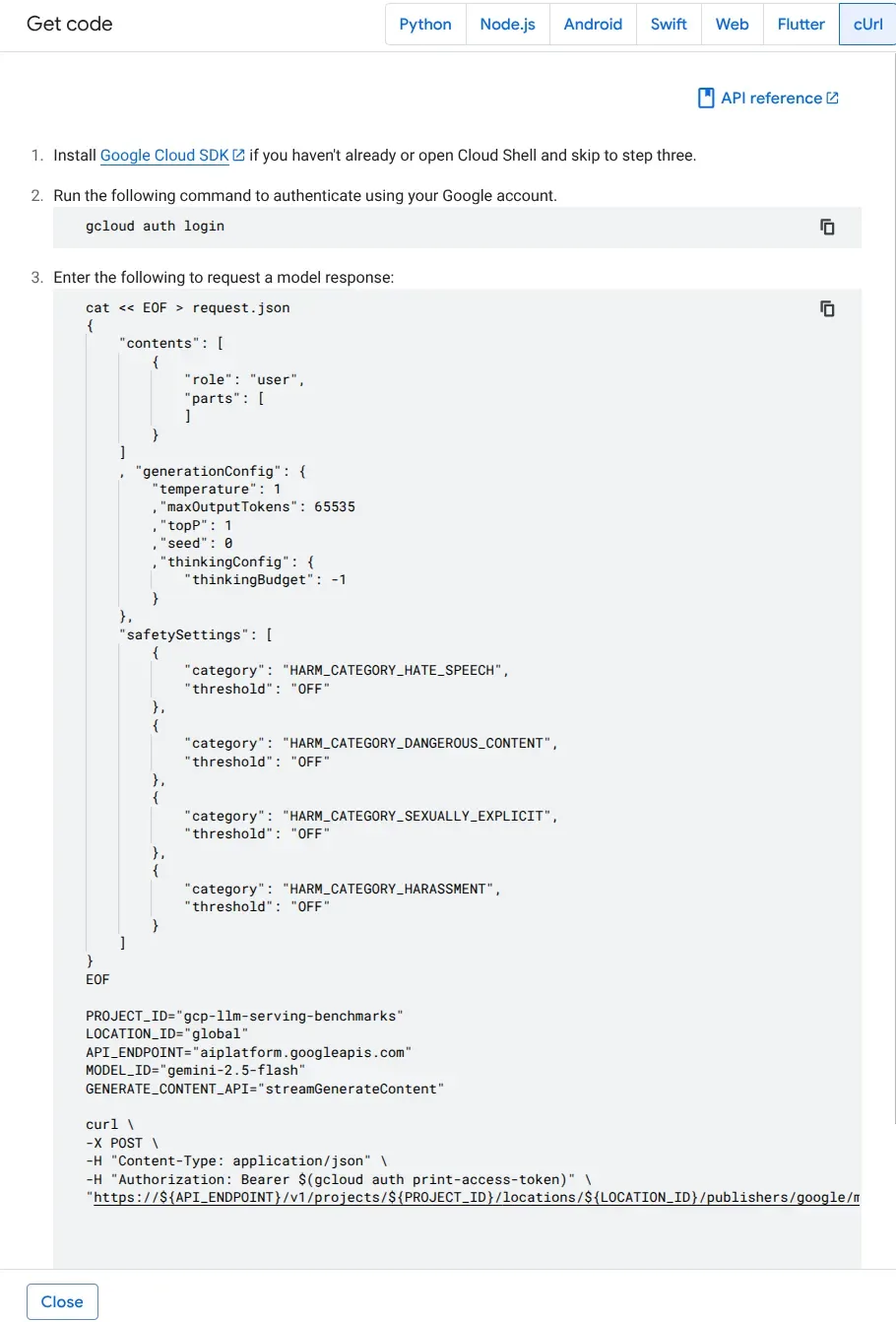
Vertex AI MaaS is Google’s fully-managed, serverless offering for its first-party models like Gemini and third-party models like Claude. It’s the easy solution for getting started. You interact with it via a simple API call, and Google handles all the underlying infrastructure for you.
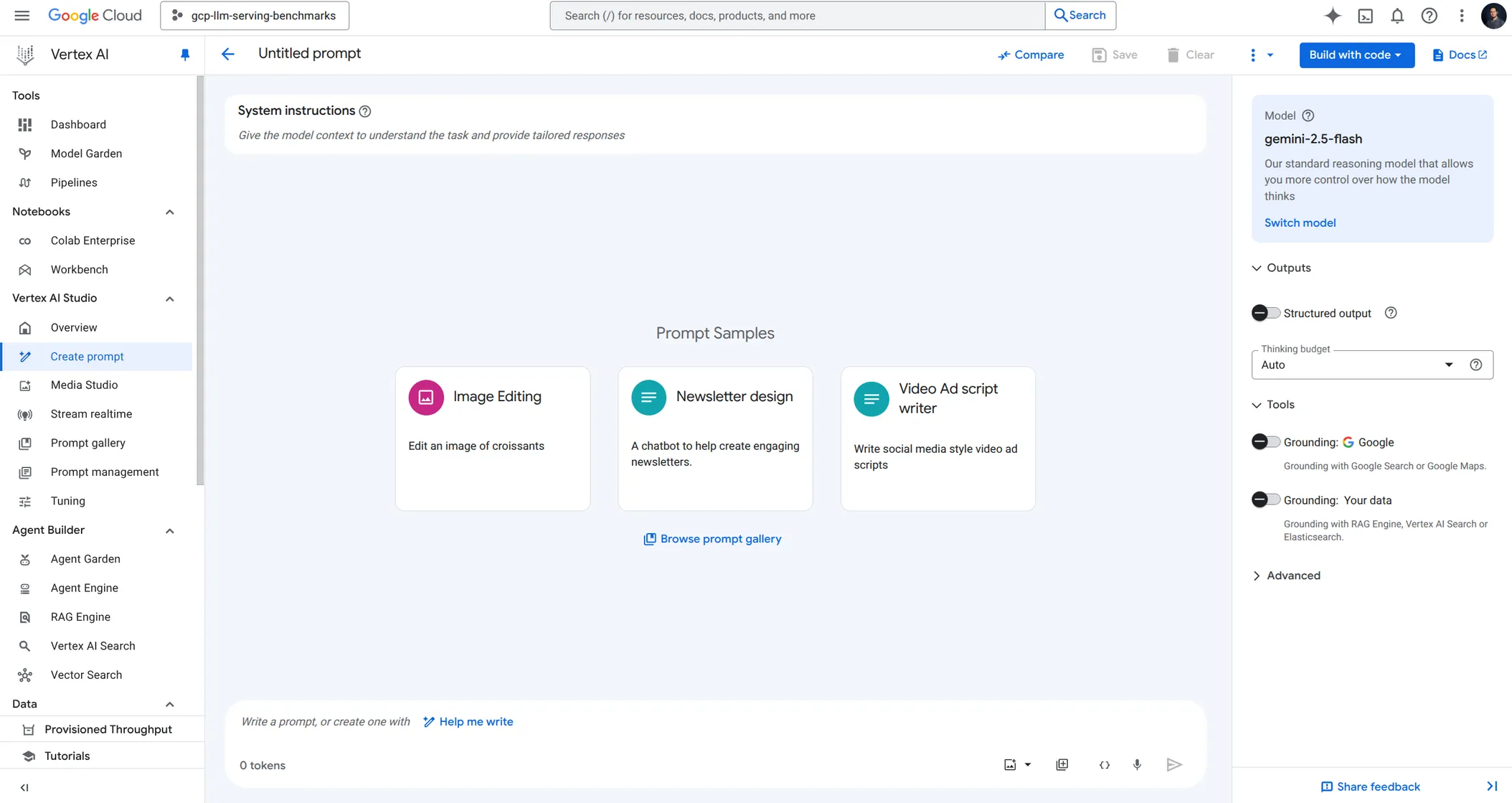
- The Good: It’s incredibly convenient. There’s no infrastructure to manage, it integrates seamlessly with the GCP ecosystem, and you pay per use for each input/output tokens. For building applications like RAG systems or agents where you don’t have stringent scalability requirements, this is a fantastic starting point!
- The Challenge: This simplicity comes at the cost of control. As our benchmarks show, the default pay-as-you-go model has strict rate limits. When under load, you’ll quickly run into
429 - RESOURCE_EXHAUSTEDerrors. The primary lever for scaling is either increasing your account quotas, or purchasing provisioned throughput which reserves capacity for your model but comes at a significant cost. You also have limited knobs to tune performance (e.g., disable the “thinking” mode, which can reduce latency for certain use cases).
2. Vertex AI Endpoint for Open Models 🏕️
Vertex AI Online Inference allows you to deploy open-source models like Gemma using pre-built, optimized containers. You get a managed solution but with more control over the underlying hardware and scaling behavior than MaaS.
- The Good: It’s a great trade-off between power and simplicity. You can select your machine type and GPU (e.g., an
g2-standard-24with 2 x L4 GPU), configure scaling parameters, and deploy. It abstracts away much of the complexity of managing infrastructure, making it ideal for teams that want to expose an LLM without a dedicated MLOps or Kubernetes expert.
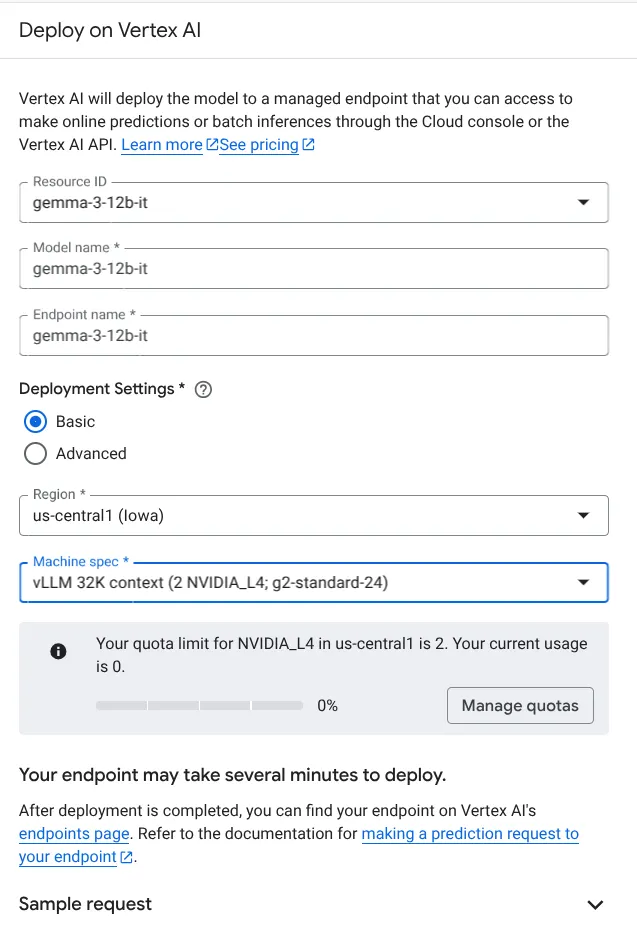
- The Challenge: While managed, it’s not free. There’s an additional price tag for the endpoint itself on top of the compute resources. As you can see when configuring the endpoint, you need to define machine types and accelerators. Monitoring latency and resource utilization is crucial to finding the right balance. You must carefully configure the auto-scaling settings to handle load without over-provisioning.
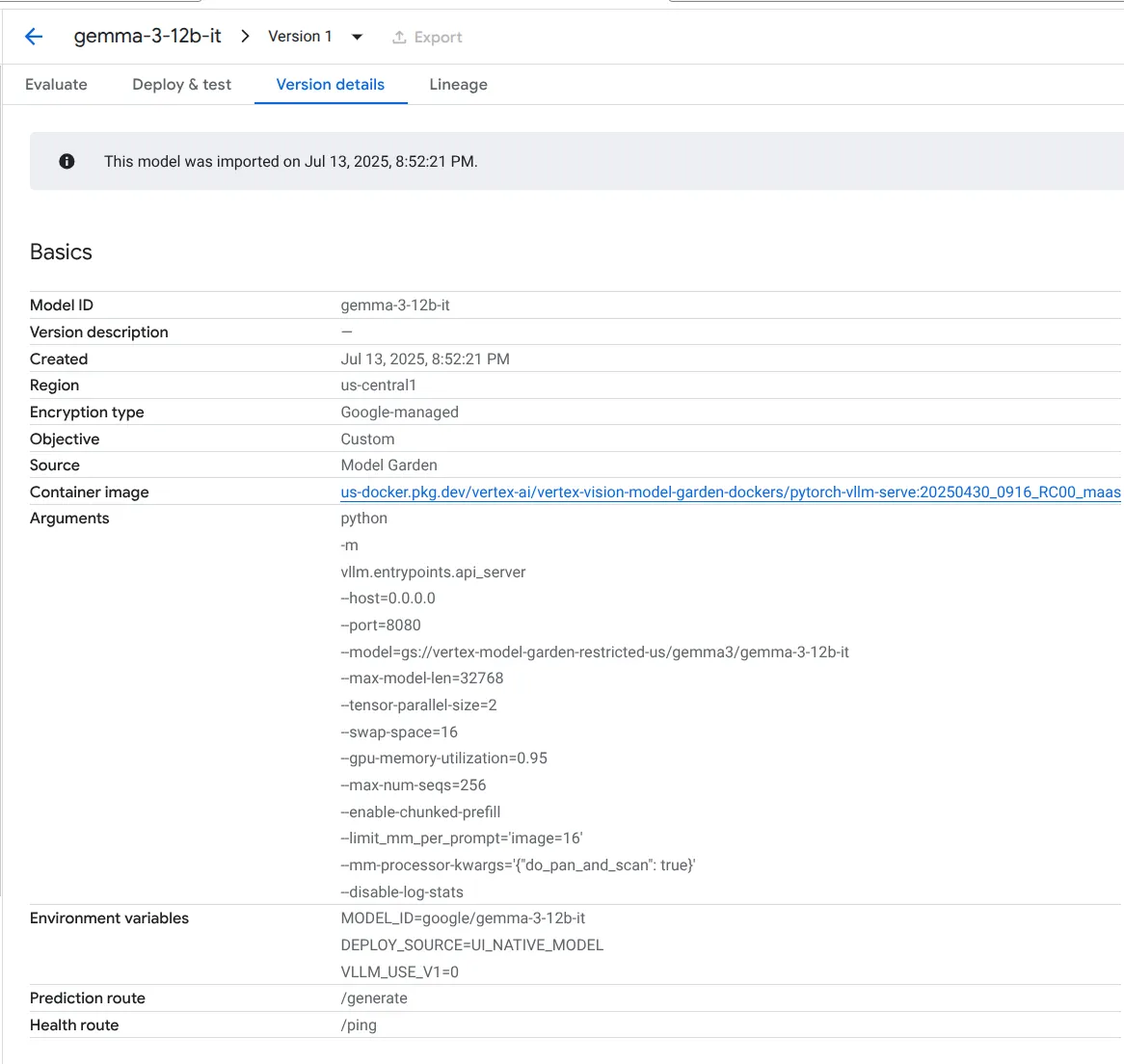
3. Cloud Run with GPU + Ollama 🚗
Cloud Run offers a serverless approach for running custom containers, now with GPU support. By default, GCP proposes to deploy Gemma 3 using a container running the popular Ollama serving framework.
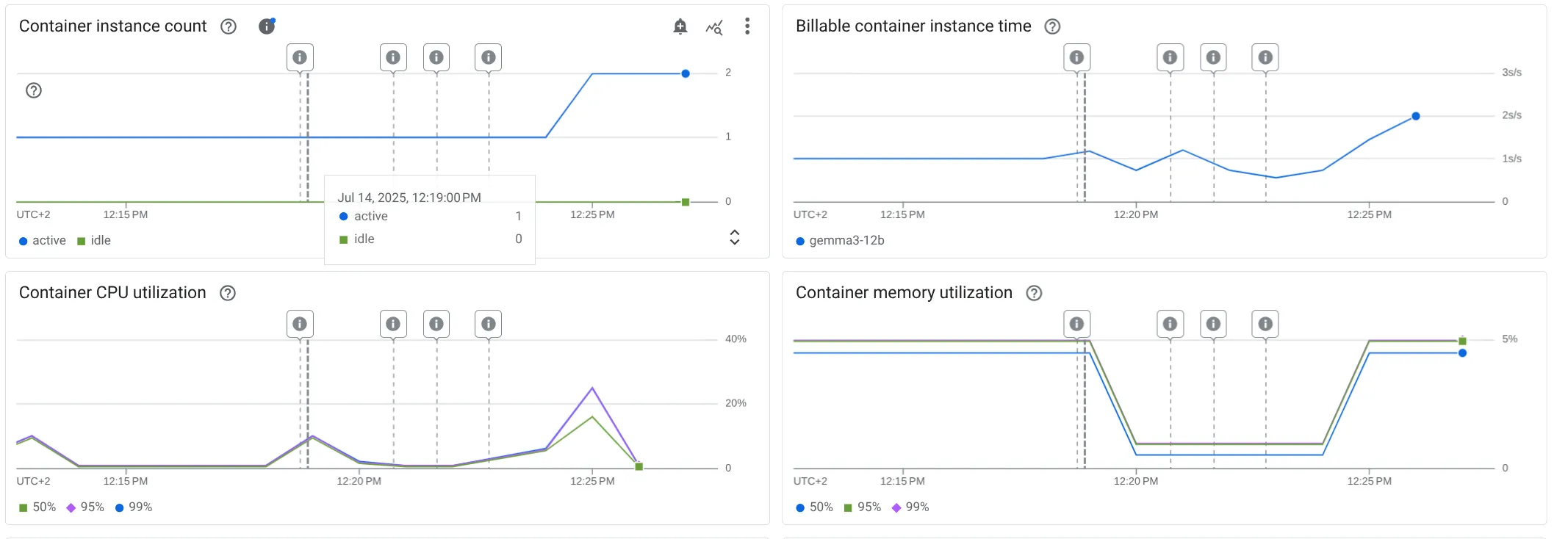
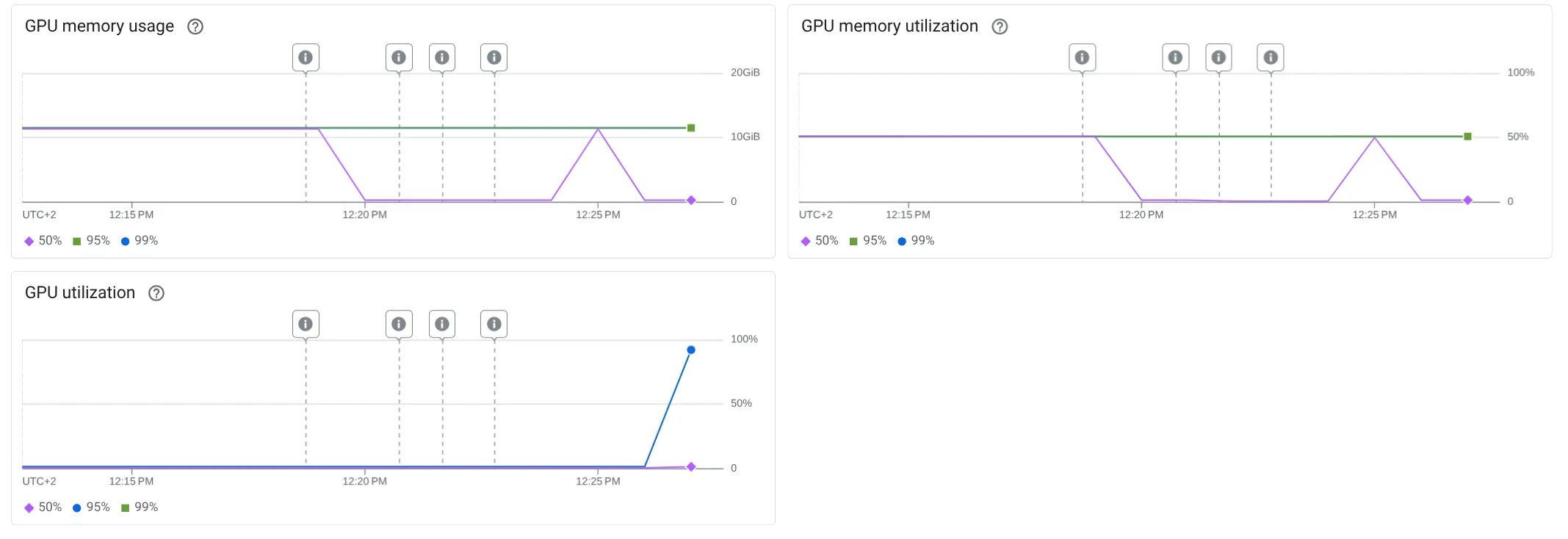
- The Good: This combines serverless simplicity with GPU power. It’s excellent for applications with variable traffic, as it can scale down to zero, saving costs. It’s a fantastic way to quickly build proofs-of-concept and applications with an embedded LLM without committing to a full-blown Kubernetes cluster.
- The Challenge: Cloud Run’s primary limitation for large-scale serving is that you can only attach one GPU per instance. While you can scale out by adding more instances, this concurrency-based scaling can be less efficient for LLMs than having a single, powerful instance with multiple GPUs that can handle larger batches. As our results show, this approach hit its limits and produced a high number of failures under heavy load.
# setup the cloud run ollama model serving
setup-cloud-run-ollama model="gemma3-12b":
 gcloud run deploy {{model}}-ollama \
  --cpu=8 --max-instances=2 --memory=32Gi \
  --gpu=1 --gpu-type=nvidia-l4 --no-gpu-zonal-redundancy \
  --image=us-docker.pkg.dev/cloudrun/container/gemma/{{model}} \
  --timeout=600 --concurrency=8 --ingress=all \
  --allow-unauthenticated --no-cpu-throttling \
  --project=$PROJECT_ID --region=$LOCATION \
  --set-env-vars OLLAMA_NUM_PARALLEL=4 \
  --set-env-vars API_KEY=$API_KEY

# proxy the cloud run ollama model serving
proxy-cloud-run-ollama model="gemma3-12b":
 gcloud run services proxy {{model}}-ollama --port=8080 --region=$LOCATION --project=$PROJECT_ID
4. GKE + vLLM (The Unclimbed Peak) 🏔️
Google Kubernetes Engine (GKE) is the most powerful and flexible solution. By deploying a model on GKE with a high-performance serving framework like vLLM, you can achieve maximum performance and have fine-grained control over every aspect of the deployment.
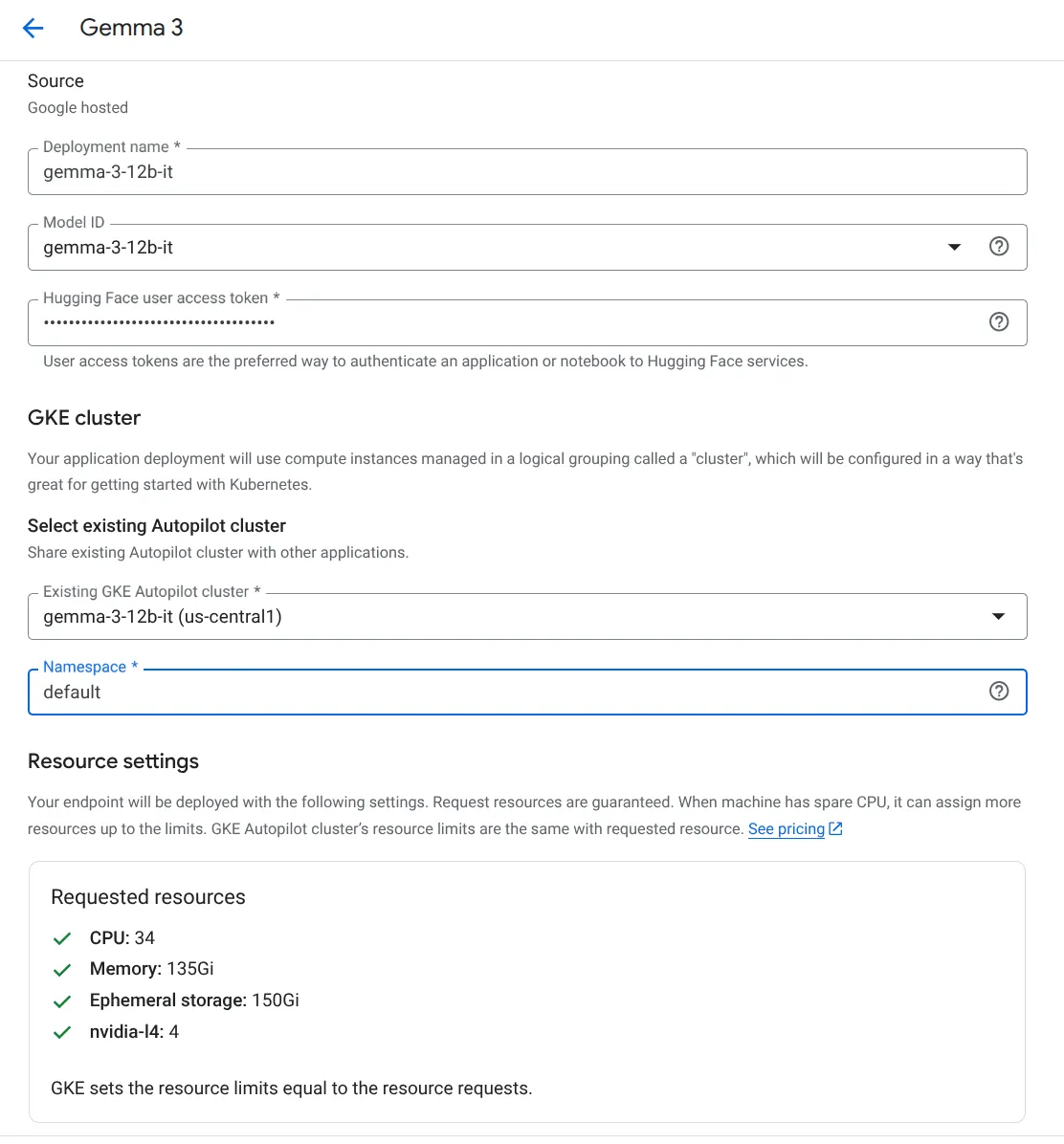
- The Good: Unmatched power, control, and potential for throughput. For demanding, large-scale production workloads, this is the ultimate architecture. Google has made strides in simplifying this process with a dedicated section on AI/ML workloads, like this tutorials on serving Gemma with vLLM on GKE.
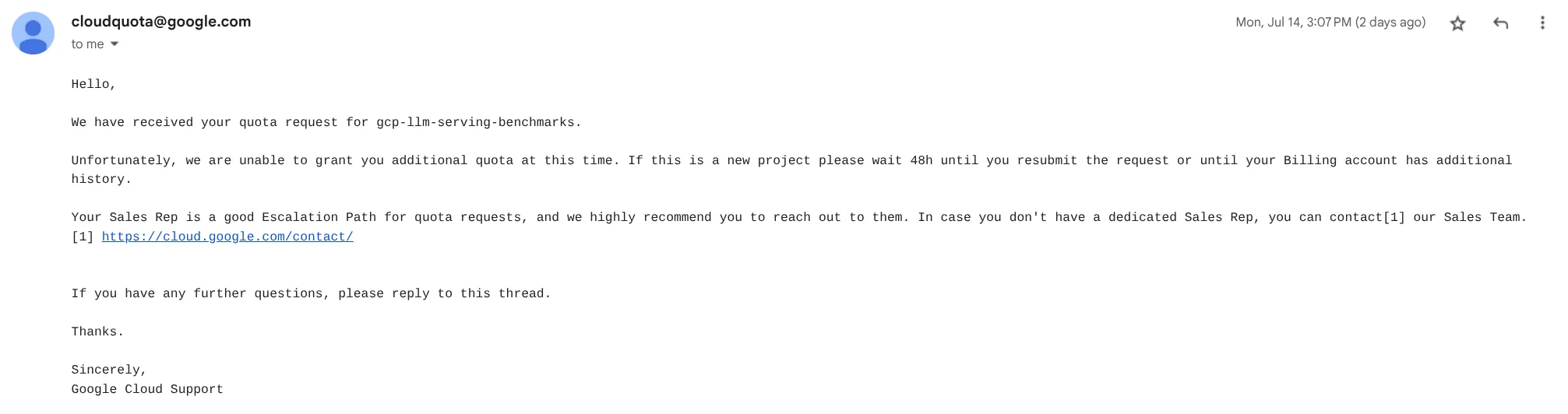
- The Challenge: Complexity. This path is not for the faint of heart. In this end, it requires significant Kubernetes expertise to configure networking, node pools, autoscaling, and the serving framework itself. In my case, this peak remained unclimbed. Due to project quotas limiting me to a single L4 GPU, I couldn’t provision the necessary multi-GPU GKE node required to serve the Gemma 3 12B model effectively, highlighting a very real-world constraint for small teams and companies.
📊 Analyzing the Results
The benchmark data paints a clear picture of the trade-offs between the different serving solutions. While some approaches appear to handle a high volume of requests, a closer look at the failure rates and response times reveals the true story of their performance under pressure.
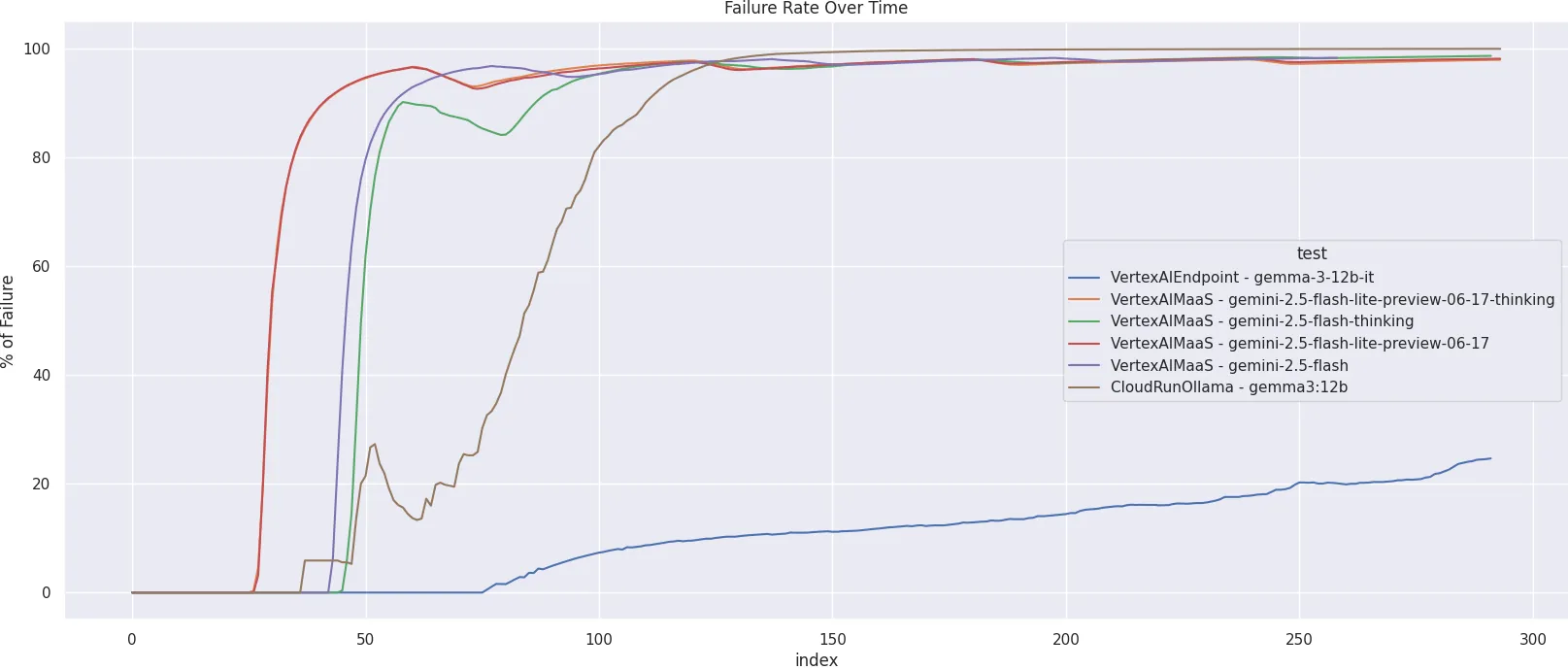
- Overall Performance: A summary of the test runs shows a stark contrast in reliability. While the Vertex AI MaaS and Cloud Run Ollama services processed a very high number of total requests (over 100,000 each), the vast majority of these were failures. For instance,
VertexAIMaaS - gemini-2.5-flash-lite-preview-06-17had 163,993 requests but 160,879 failures. In contrast, Vertex AI Endpoint handled a smaller volume of total requests (1,213) but with a significantly lower failure count (311). - Failure Rate and Types: The reasons for failure are critical. The MaaS models consistently failed with
HTTPError: 429 Client Error: Too Many Requests, indicating they were quickly overwhelmed by the load and hit their rate limits. CloudRun Ollama failed with a mix of server errors500,503and429s, suggesting the instances were completely saturated. The “Failure Rate Over Time” chart dramatically illustrates this. The MaaS and CloudRun solutions see their failure rates shoot to nearly 100% almost immediately as user load increases. VertexAIEndpoint, however, shows a much more gradual and controlled increase in its failure rate, never reaching the catastrophic levels of the other services.
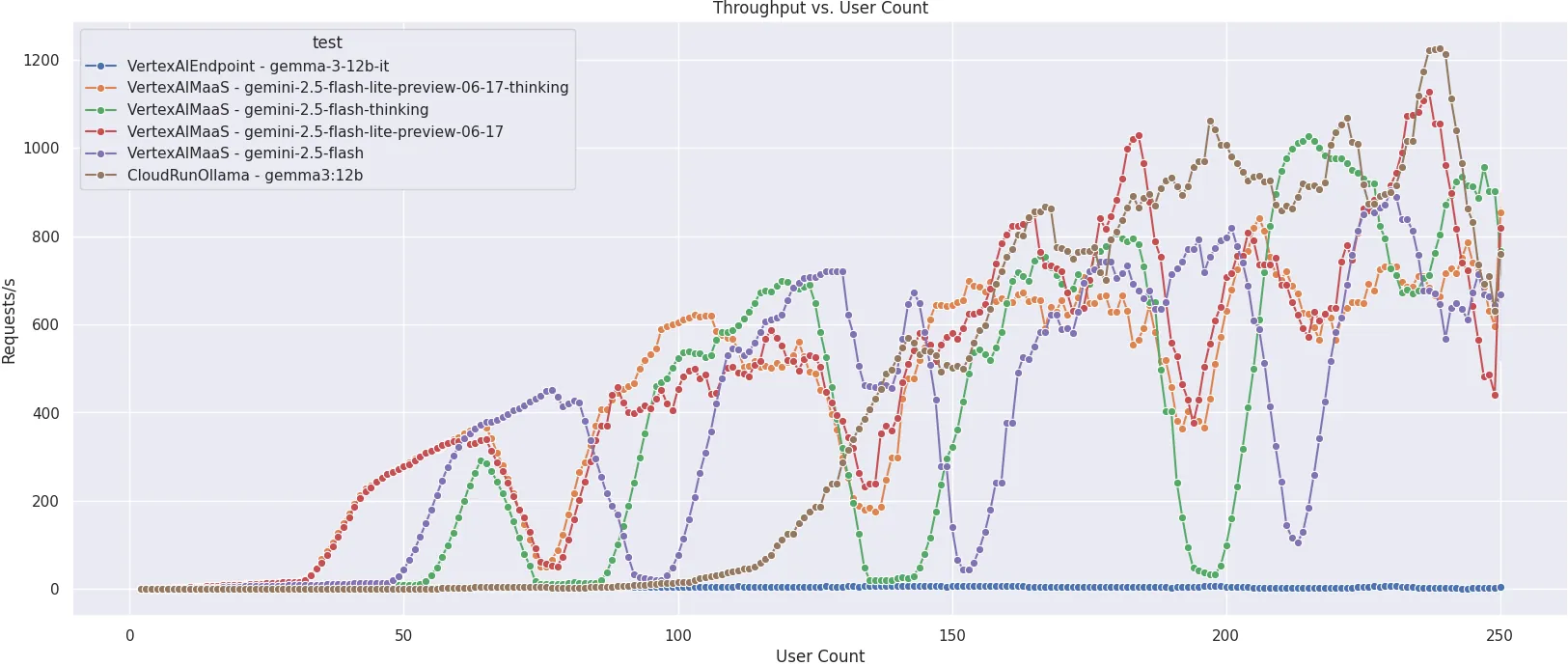
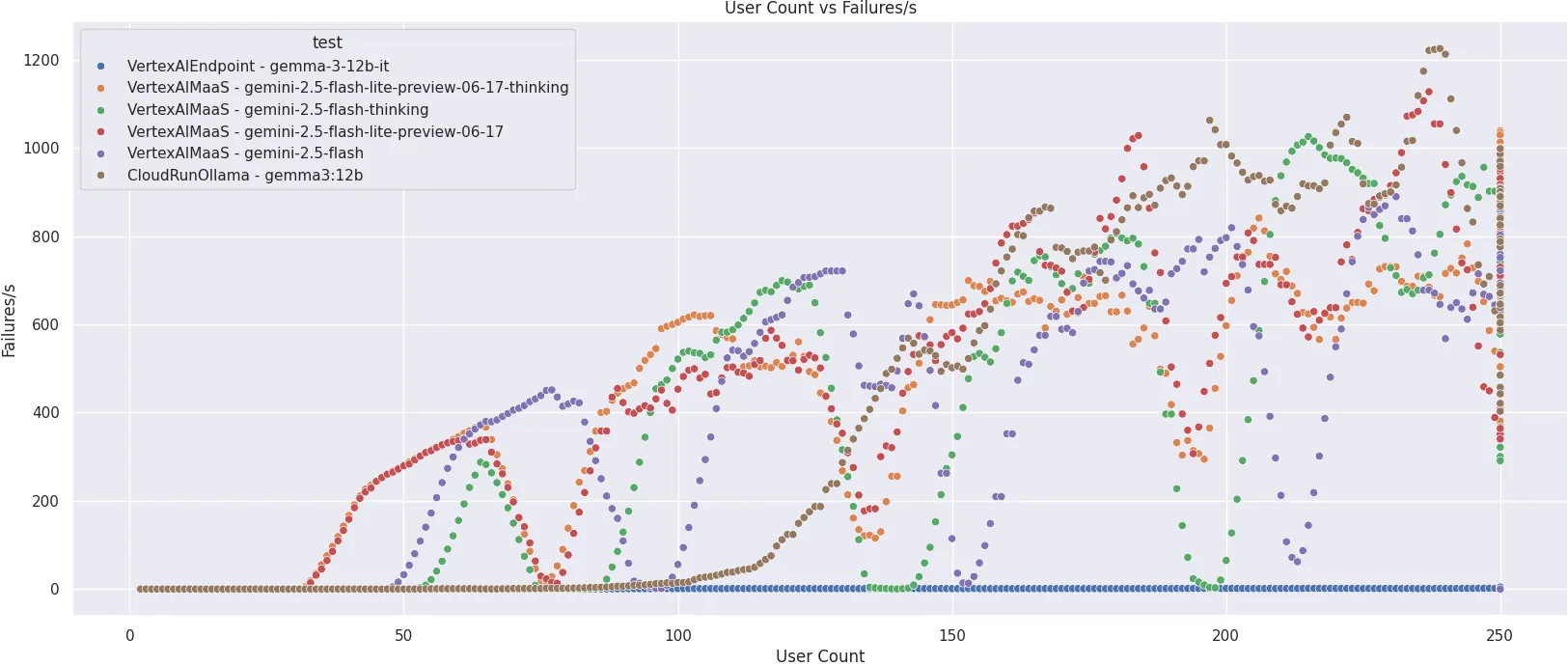
- Throughput vs. Success: The “Throughput vs. User Count” graph shows that several services achieved high peak “Requests/s”. However, this metric is misleading on its own. High throughput is meaningless if the requests are not successful. The “User Count vs Failures/s” plot confirms that this high throughput was accompanied by an equally high rate of failures for most services.
VertexAIEndpointmaintained a very low and stable failure rate throughout the test, prioritizing successful responses over raw, unsuccessful request volume.
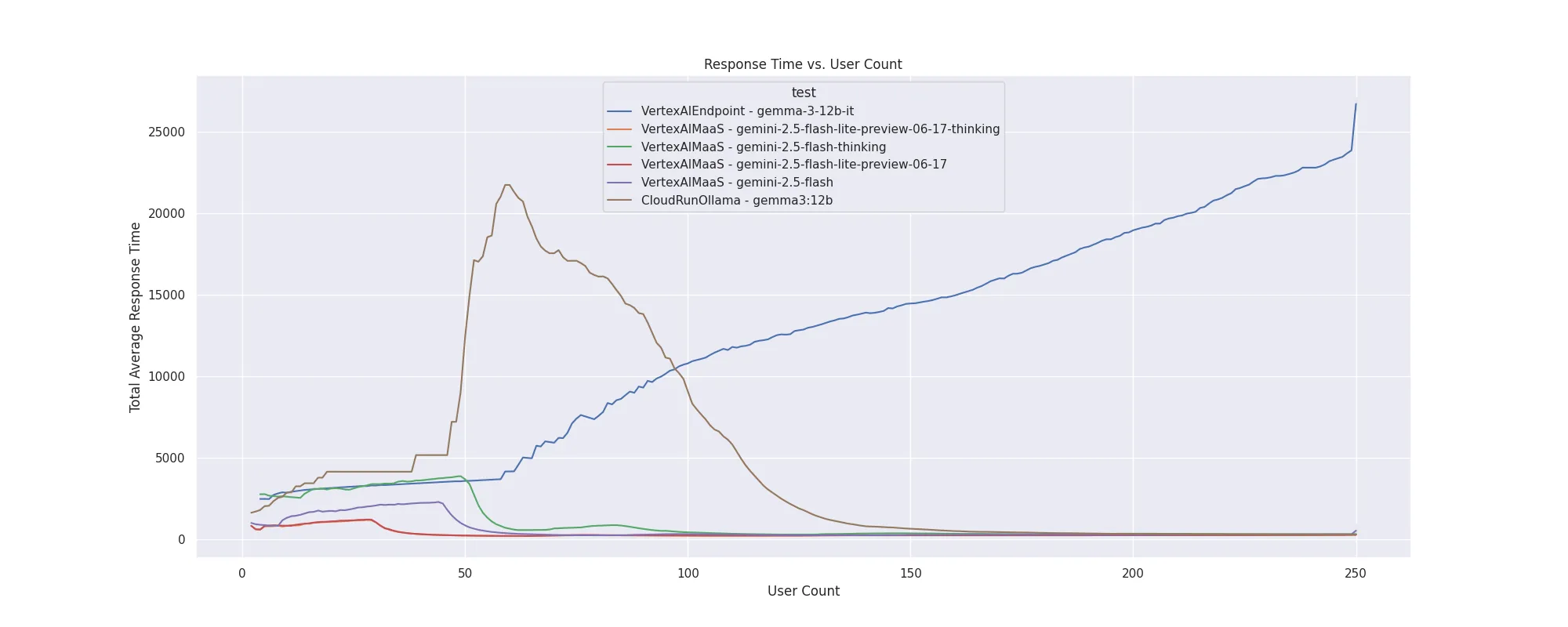
- Response Time: The “Response Time vs. User Count” chart provides the final piece of the puzzle.
- The average response time for
VertexAIEndpointincreases steadily with the user count, which is expected behavior for a system handling progressively more load. For the other services, the response time often appears low, but this is deceptive; they are not processing requests successfully but rather “failing fast” with quick error messages like a 429 response. CloudRunOllamashows an initial spike in response time before it gets overwhelmed and starts failing consistently.
In summary, the Vertex AI Endpoint demonstrated far superior resilience and stability under load. While it processed fewer total requests, it successfully served a much higher percentage of them, proving to be the most robust solution for scaling in this benchmark. The other solutions, while easy to set up, were not able to handle the escalating user load without hitting strict rate limits or becoming overwhelmed. Still, the amount of requests handled by Vertex AI Endpoint is not high enough for scaling the LLM in this current setup. While we couldn’t test GKE in this benchmark due to GPU quotas, it should provide the most scalable and controllable solution.

🧗♀️ Conclusion: Choosing Your Route
Serving LLMs at scale on GCP is a journey with multiple paths, none of which is a simple walk in the park. The “best” approach is not one-size-fits-all but depends entirely on your team’s expertise, budget, and application requirements.
- For rapid prototyping and internal tools with non-critical latency needs, Vertex AI MaaS is an excellent, hassle-free starting point. Just be prepared to manage rate limits or pay for provisioned throughput as you scale.
- For most production use cases without a dedicated Kubernetes team, Vertex AI Endpoints for open models hits the sweet spot. It provides a robust, scalable, and controllable environment without the steep learning curve of GKE. It proved to be the most resilient solution in our benchmark.
- For quick tests or applications with spiky traffic, Cloud Run with GPU is a cost-effective and viable option. However, be aware of its single-GPU-per-instance limitation, which can become a bottleneck for high-throughput scenarios.
- For ultimate performance and control at a large scale, GKE with vLLM is the summit. It offers the best performance but requires the most significant investment in infrastructure expertise.
Deploying LLMs is a complex but navigable challenge. By understanding the landscape, benchmarking your options, and choosing a path that aligns with your resources and goals, you can successfully scale the summit and deliver powerful AI experiences to your users.
- Gemma Model: https://ai.google.dev/gemma/docs/core#sizes
- Link to Benchmark on Github: https://github.com/fmind/gcp-llm-serving-benchmarks